Blog

  • ch1-docker

    What is in this repository

    apis in this repository

    Please, take a look at the general documentation in this section
    apis/

    Solution architecture topology (Docker)

    The architecture for running this project is based on docker-compose and follows the schema bellow

    for more details you can take a look at:

    docker-compose

    Explaining the different components

    Networking

    There are two different types of networks: public and private.

    The public network

    • stands for hosting public APIs and applications that need to be reachable from the internet.

    The private network

    • stands for hosting core services (private or the most critical services so to speak).

    Services

    it’s hosted in the public network

    • it cannot reach private services.
    • it routes incomming requests thru:
      • the public api-client-subscriptions
      • the private-gateway
    • it exposes specific internal/private services
    • it takes control of what resources have been accessed
    • it authenticate internal endpoints
    • it take control over one first layer of security ( like validating auth tokens against an identity server, for instance)
    • it produces interesting logs

    The private gateway

    • it routes traffic to specific services in the private network
    • it increases control over security (when exposing internal dashboards)
    • it increases control over monitoring
    • it restricts access to the private network
    • it exposes partial private services to the public network

    The api-client-subscriptions

    • it stands for basically handling requests for subscriptions creation
    • it can reach services in the public network
    • it can reach services in the private network

    The RabbitMQ (cluster)

    • it is an Nginx load balancer
    • it is composed by two rabbitMQ servers in the cluster (rabbit-1, rabbit2)
    • it is only reachable inside the private network
    • it provides dashboards with metrics about the existing message queues
    • it provides a way of publishing new event messages without needing of external tools and API’s

    The SMTP server

    • it is a simple SMTP/Mail Inbox server
    • the SMTP port can only be reachable in the private network
    • the Mailing box is exposed thru the private and public gateways for testing purposes

    The SEQ log server

    • it’s a simple tool for monitoring logs produced by the APIs.
    • it can produce nice dashboards to take control over what’s happening the APIs
    • the dashboard service is exposed thru the private and public gateway for testing purposes

    How to build and run (Docker)

    Make sure that you have docker installed on your local machine

    https://www.docker.com/get-started

    optional: if you want to download the dotnet core SDK in order to build the APIs locally, you can download it from here:
    https://dotnet.microsoft.com/download

    Clone the repository

        git clone git@bitbucket.org:jsoliveira/iban-services-poc.git

    Set the current working directory

        cd infrastructure/docker

    Clean up your docker environment

        #!/bin/sh
        rm -f  ~/.docker/config.json;
        docker-compose down
        docker system prune --all
        docker network prune -f

    Startup all containers

        docker-compose -f "infrastructure/docker/docker-compose.yml" up --force-recreate --remove-orphans --build

    Startup a single container

    	# docker-compose build <api_name>;
        docker-compose -f "infrastructure/docker/docker-compose.yml" up --force-recreate --remove-orphans --build api-client-subscription;

    if you want to debug or startup an API using the dotnet core SDK please take a look at the existing API documentation in this repository apis/

    How to deploy into Kubernetes Cluster

    For demo purposes the public gateway is exposed using a NodePort service
    infrastructure/kubernetes/1.19.3/gateways/public-gateway/service.yml

    	kubectl kustomize  "infrastructure/kubernetes/1.19.3/" | kubectl apply -f -

    The public gateway is exposed on port 8080.

    These are the URLs available :

    http://localhost:8080/public/subscriptions/swagger/index.html

    http://localhost:8080/private/mq/

    http://localhost:8080/private/seq/

    http://localhost:8080/private/seq/

    The links below are also available thru HTTPS over port 30443

    In a production environment with multiple nodes (VM) the public gateway would be exposed thru an ingress controller or thru a LoadBalance service.


    Important Notes

    RabbitMQ cluster can take up to 2 minutes to get up and running (clustering)

    While it is initializing, if core.subscription API gets requested it will not responding until it reaches the MQ cluster

    Check the following documentation for more details: api-core-subscriptions/

    How to make sure that RabbitMQ is already up and running

    Try to reach the RabbitMQ management portal, if you don’t get a warning message then you’re good to go.

    http://localhost:8080/private/mq/

    How to check if the public API is also running

    If you see the OpenAPI documentation in the following link then it’s all set.

    http://localhost:8080/public/subscriptions/swagger/


    Interesting Links

    RabbitMQ cluster manager

    http://localhost:8080/private/mq/

    credentials : user: guest | pass: guest

    SEQ Logging dashboards

    http://localhost:8080/private/seq/

    Mail inbox dashboards

    http://localhost:8080/private/smtp/

    Public API Swagger

    http://localhost:8080/public/subscriptions/swagger/

    authentication token: any string

    you’ll need the following credentials in order to get authorized by the public gateway to access the private links above

    username: admin

    password: admin

    CI/CD Integration

    This repository has configurations to deploy container images into a container registry.

    Docker hub was used as the main container registry for the purpose of this demo)

    Bitbucket Pipelines

    Bitbucket Pipelines

    CI/CD Azure DevOps

    Azure Devops

    Visit original content creator repository

  • sttabt

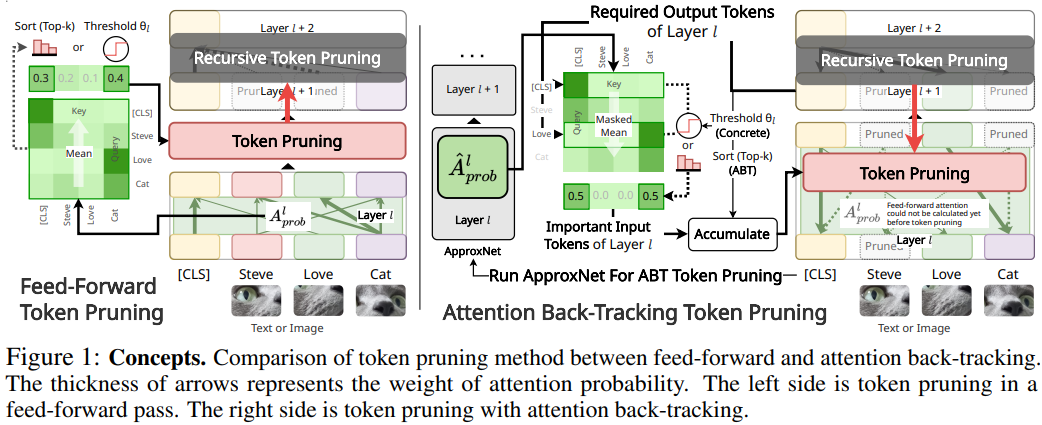
    STTABT: Sparse Token Transformer with Attention Back-Tracking [Paper]

    image

    This repository inlcudes official implementations for STTABT.

    [OpenReview] [BibTeX]

    Sparse Token Transformer with Attention Back-Tracking
    🏫🤖Heejun Lee, 🏫👽Minki Kang, 🏫🏛️Youngwan Lee, 🏫Sung Ju Hwang
    KAIST:school:, DeepAuto.ai🤖, AITRICS👽, ETRI🏛️
    Internation Conference on Learning Representation (ICLR) 2023

    Abstract

    Despite the success of Transformers in various applications from text, vision, and speech domains, they are yet to become standard architectures for mobile and edge device applications due to their heavy memory and computational requirements. While there exist many different approaches to reduce the complexities of the Transformers, such as the pruning of the weights/attentions/tokens, quantization, and distillation, we focus on token pruning, which reduces not only the complexity of the attention operations, but also the linear layers, which have non-negligible computational costs. However, previous token pruning approaches often remove tokens during the feed-forward stage without consideration of their impact on later layers’ attentions, which has a potential risk of dropping out important tokens for the given task. To tackle this issue, we propose an attention back-tracking method that tracks the importance of each attention in a Transformer architecture from the outputs to the inputs, to preserve the tokens that have a large impact on the final predictions. We experimentally validate the effectiveness of the method on both NLP and CV benchmarks, using Transformer architectures for both domains, and the results show that the proposed attention back-tracking allows the model to better retain the full models’ performance even at high sparsity rates, significantly outperforming all baselines. Qualitative analysis of the examples further shows that our method does preserve semantically meaningful tokens.

    Experiments

    ViT Concrete Masking

    #training
    python -m main.vit_concrete_end2end --n-gpus $NGPU --imagenet-root /path/to/ILSVRC2012/
    #ploting
    python -m main.plot.vit_concrete_with_dyvit
    python -m main.plot.vit_concrete_flops
    python -m main.visualize.vit

    LVViT concrete samples

    End2end.

    python -m main.vit_concrete_end2end --factor 4 --n-gpus 3 --model lvvit-small --master-port 14431 --auto-resume --p-logits "-1.5 -1.0 -0.5 0.0 1.0"

    Skip approx.

    python -m main.vit_concrete_end2end --factor 4 --n-gpus 1 --model lvvit-small --master-port 14431 --auto-resume --p-logits "-1.5 -1.0 -0.5 0.0 1.0" --skip-approx --batch-size 32

    GLUE Tasks

    WIP… Please check trainer folder.

    main.approx_glue_plot
    main.concrete_glue_plot
    main.ltp_glue_plot
    

    Citation

    @inproceedings{
        lee2023sttabt,
        title={Sparse Token Transformer with Attention Back Tracking},
        author={Heejun Lee and Minki Kang and Youngwan Lee and Sung Ju Hwang},
        booktitle={International Conference on Learning Representations},
        year={2023},
        url={https://openreview.net/forum?id=VV0hSE8AxCw}
    }

    Visit original content creator repository

  • modal_box

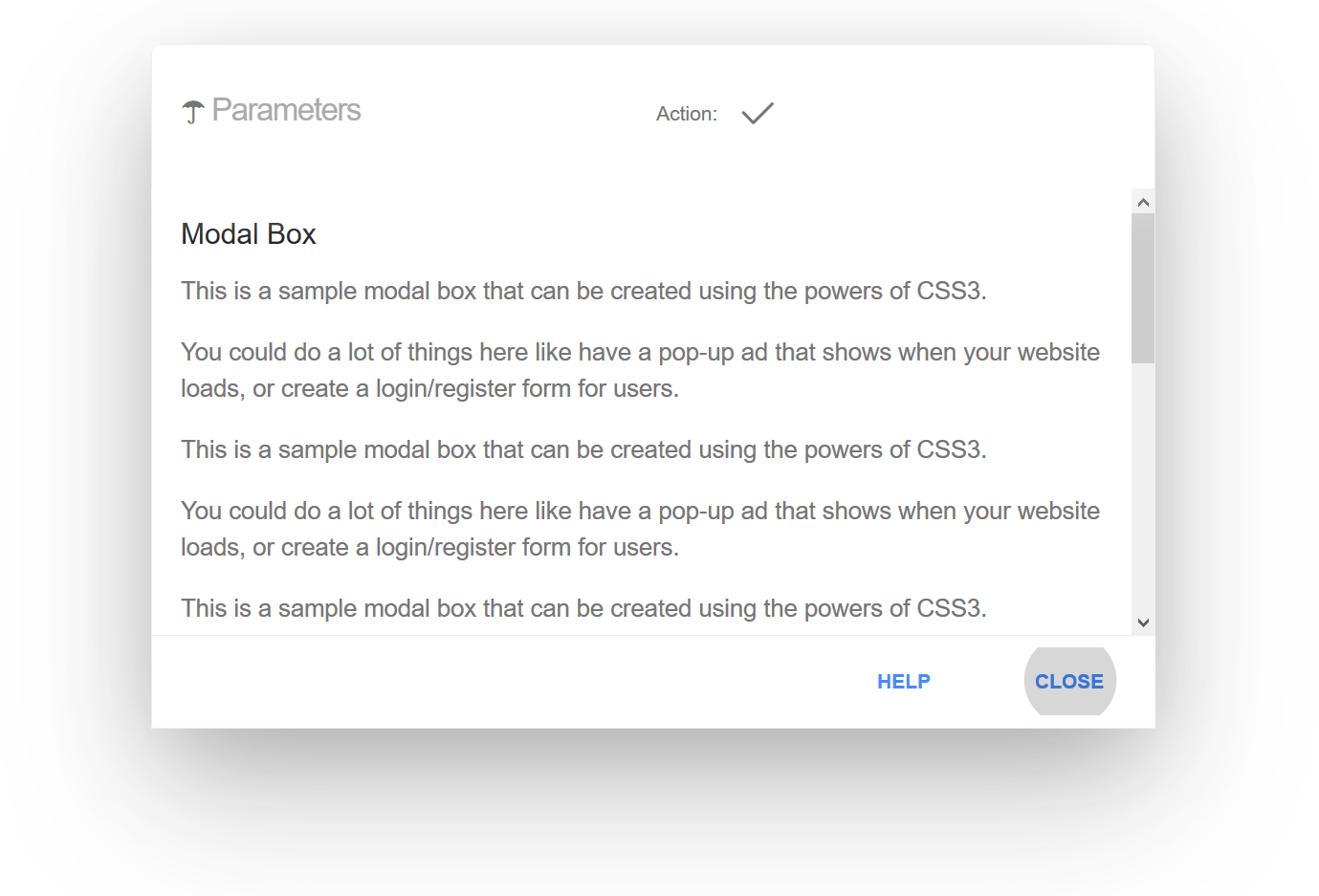
    CSS Modal Box

    Browsers Licence

    Pure CSS Modal Box, “responsive” with a pretty good browsers support: IE6 minimum! (See this demo here)

    Prevents other CSS rules conflicts; animation with Hardware-Accelerated features; fully responsive with width and height support within all screen sizes.

    This component template has been tested successfully in (real systems not from emulators):

    • Internet Explorer 6 (see below);
    • Internet Explorer 7 (see below);
    • Internet Explorer 8 (even in regressive ‘Compatibility View’; see below);
    • Internet Explorer 9;
    • Internet Explorer 10;
    • Internet Explorer 11;
    • Microsoft Edge (all versions);
    • Internet Explorer (Microsoft Windows Phone 7.5 system);
    • Safari 5.x;
    • Safari Mobile;
    • Opera 9.64 PC;
    • Opera 11 Linux;
    • Opera Mini (Microsoft Windows Phone 7.5 system);
    • Internet Explorer Mobile (Microsoft Windows Phone 8.x system);
    • Opera Mini for android, version 7.5.x;
    • Opera Mini android (latest version);
    • Opera Mini 14 for iOS;
    • UC Browser (Mini or HD version for Android & normal version for PC);
    • UC Browser 10.x for iOS;
    • default browser in Android 2.3.6 (TO DO: font sizes need adaptation);
    • FireFox 1.0.8 minimum;
    • FireFox 52 ESR;
    • Midori 0.4;
    • Google Chromium (all versions: PC & Mac; iOS & Android);
    • Brave;
    • Vivaldi;
    • Camino 2.1 Mac;
    • Shiira Mac;
    • OmniWeb 5 Mac.

    Here is a new version with the use of Flexbox & CSS Grid Layout for hipsters and nerds keeping a pretty good support within old browsers: IE6 minimum capable. Please note these new CSS features in this web design sample do not act any kind of noticed advantages. Online latest demo

    Usage

    First, you need to encapsulate your entire content page into a div with a class name wrapper. Then, place the Modal Box template outside this wrapper block. Simple! Note. The default template is white and blue. For customization, see this sample here

    This content package (v1.2 onward)

    This minimal default component (required) is distributed in white/blue colors (see screen shots) and do not include the styles for inner optional elements within the modal header (File: modal-box.min.css).

    In order to add these additional supports, please include the optional styles (File: custom.css).

    A red colored example, well commented, is available for your customization convenience (File: template.css previously, file: custom.css). .

    An independant demo.html file with full styles is available for integration example (File: demo.html).

    Helpers for customization

    This package is distributed with some class helpers:

    • tiny: to create small width Modal Boxes (max-width: 20em) useful for login.
    • push__left: to place the close button, or the entire Modal Box to the left;
    • push__right: to place the entire Modal Box on the right;
    • footer-push__left: to float the footer’s links on the left;
    • footer-push__center: to place the footer’s links on the center;
    • footer__reverse: to reverse the order of the footer’s links;
    • footer-push__block: to display all the footer’s links empiled without the scroll bar (the footer adapts it’s height accordingly);

    See the templates for how tos integration.

    Custom template sample

    Remove all the code between <style> and </style> from the demo.html page, then add before the final </head> tag:

    <link rel=”stylesheet” href=”css/custom.min.css” media=”screen”> <link rel=”stylesheet” href=”css/flaterial.css” media=”screen”>’>
    <link rel="stylesheet" href="https://github.com/cara-tm/css/modal-box.min.css" media="screen">
    <!-- Facultative: for optional elements -->
    <link rel="stylesheet" href="css/custom.min.css" media="screen">
    <!-- Sample custom colors styling (overwrite default) -->
    <link rel="stylesheet" href="css/flaterial.css" media="screen">
    

    FLATERIAL template sample.

    Custom template for messaging (v1.5 onward)

    See the file message-box.html for details:

    FLATERIAL template sample.

    Integration example

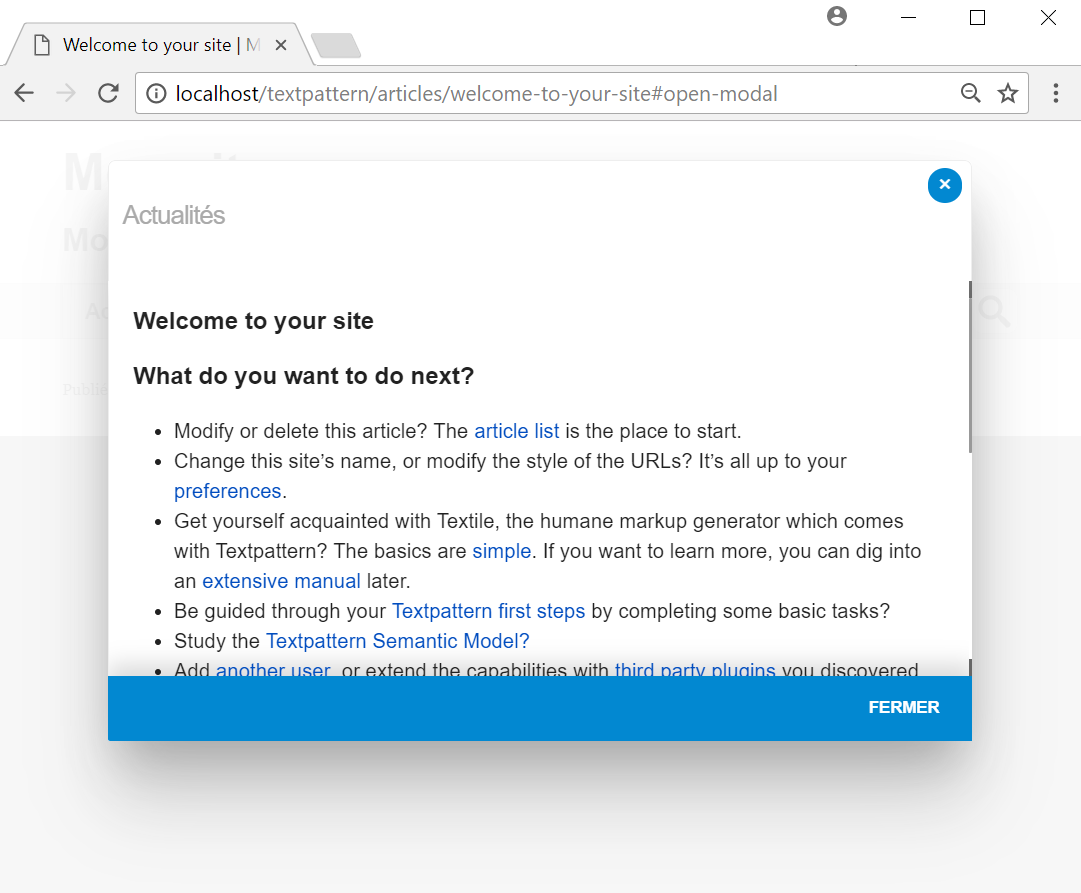
    Here is an integration test within the default Textpattern template (v 4.7-dev) without any kind of conflicts even by putting the modal’s styles at the beginning of the default.css file:

    TXP intégration sample.

    Note

    CSS rules has been verified troughout the online “Validate your CSS for different browsers” (features providing by Caniuse): https://www.browseemall.com/Compatibility/ValidateCSS

    Screen shots

    See the ‘png’ images for all the different browsers.

    Visit original content creator repository
  • car-listings-full-stack-web-app

    🚗 Car Listings Application

    main


    Screenshot 2024-11-10 at 22 49 00

    📚 Overview

    The Car Listings Application is a full-stack web application designed to allow users to browse and interact with car listings. Users can view detailed specifications of cars and apply for trade-ins.

    This app uses React, TypeScript, and Tailwind CSS for the frontend, and a Node.js API with PostgreSQL for backend functionality.

    You can see the screenshots from the desktop and mobile at the bottom.

    🚀 Live Preview

    You can have a look at the live preview link:

    🖥️ Figma Design

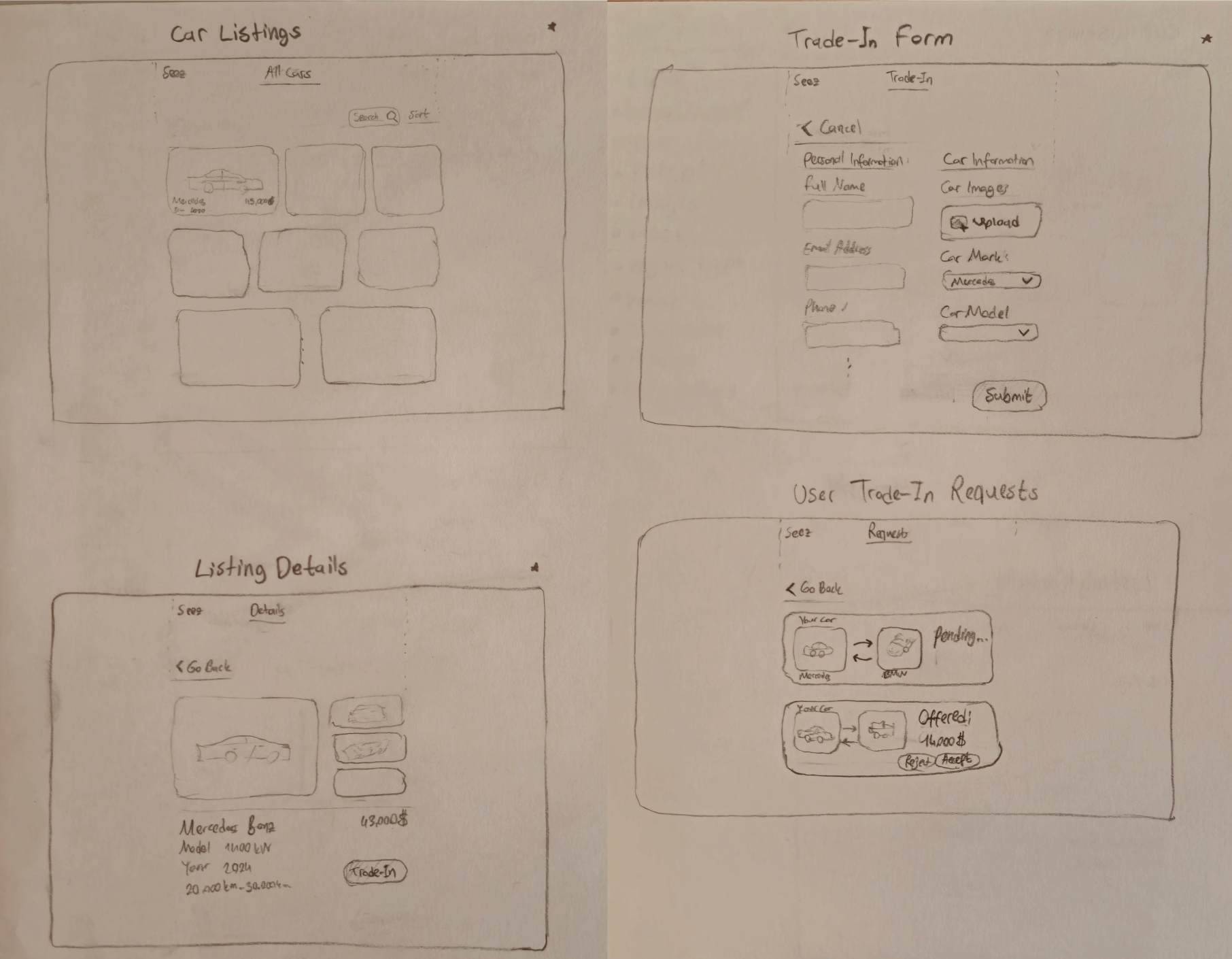
    ℹ️ This project was fully designed and developed by me — from the initial sketches on paper to every pixel and line of code:

    Screenshot 2025-06-13 at 22 26 20 (1)

    Check out the complete UI design in Figma:

    🛠️ Features

    • 🚗 Car Listings: View detailed pages for each car listing, including make, model, images, and specifications.
    • 🔄 Trade-In Application: Users can apply for a trade-in directly from the car’s details page.
    • 📝 Form Submission: The trade-in form accepts essential vehicle information (make, model, year, mileage) and allows image uploads.
    • ✅ Form Validation: Backend and frontend form validation powered by Zod.
    • 🔐 Authentication/Login: Secure login with JWT for user authentication.
    • 💡 User Experience Enhancements: Clean, user-friendly design elements for improved usability.
    • 📦 Mocked Data: The app uses mocked data for demonstration, hosted in memory.
    • 🔢 Sorting & Cursor-based Infinite Scroll: Sort car listings by price, year, and mileage while using infinite scrolling.
    • 🔍 Search Functionality: Search for cars by make and model.
    • 🔄 Infinite Scrolling: The car listing page supports infinite scrolling, loading additional cars as the user scrolls down.

    🛠️ Technologies Used

    🖥️ Frontend

    • React 📦
    • TypeScript 🖋️
    • Figma for Complete Design 🎨
    • Tailwind CSS for a fully responsive design across different devices 📱💻
    • Framer Motion & Swiper for animations 🎞️
    • React Hook Form for form handling 📝
    • Zod for form validation 🔒
    • Axios for HTTP requests 🌐

    🔙 Backend

    • Node.js 🟢
    • NestJS 🐦
    • Prisma ORM 🔗
    • PostgreSQL 🗄️

    📂 Folder Structure

    Backend Folder Structure

    backend/
    ├── .env
    ├── .eslintrc.js
    ├── .gitignore
    ├── .prettierrc
    ├── nest-cli.json
    ├── package-lock.json
    ├── package.json
    ├── prisma/
    ├── src/
    │   ├── app.controller.spec.ts
    │   ├── app.controller.ts
    │   ├── app.module.ts
    │   ├── app.service.ts
    │   ├── auth/
    │   │   ├── auth.controller.spec.ts
    │   │   ├── auth.controller.ts
    │   │   ├── auth.middleware.ts
    │   │   ├── auth.module.ts
    │   │   ├── auth.service.spec.ts
    │   │   └── auth.service.ts
    │   ├── cars/
    │   │   ├── cars.controller.ts
    │   │   ├── cars.module.ts
    │   │   ├── cars.service.ts
    │   │   └── cars.types.ts
    │   ├── trade-in/
    │   │   ├── trade-in.controller.ts
    │   │   ├── trade-in.module.ts
    │   │   └── trade-in.service.ts
    │   ├── users/
    │   │   ├── users.module.ts
    │   │   ├── users.service.spec.ts
    │   │   └── users.service.ts
    │   ├── utils/
    │   │   └── dollarFormatter.ts
    │   └── main.ts
    ├── test/
    └── tsconfig.build.json
    
    Frontend Folder Structure
    
    frontend/
    ├── .gitignore
    ├── index.css
    ├── main.tsx
    ├── package.json
    ├── vite-env.d.ts
    ├── src/
    │   ├── components/
    │   │   ├── Footer.tsx
    │   │   ├── Gallery.tsx
    │   │   ├── Navbar.tsx
    │   │   ├── Toast.tsx
    │   │   ├── Topbar.tsx
    │   │   ├── TradeInForm.tsx
    │   │   └── ui/
    │   │       ├── CarBrandIcon.tsx
    │   │       ├── CustomButton.tsx
    │   │       ├── EngineTypeIcon.tsx
    │   │       ├── ScrollToTop.tsx
    │   │       └── SortDropdown.tsx
    │   ├── config/
    │   │   └── endpoints.ts
    │   ├── containers/
    │   │   └── CarList.tsx
    │   ├── controllers/
    │   │   ├── carController.tsx
    │   │   ├── carDetailsController.tsx
    │   │   ├── loginFormController.tsx
    │   │   └── tradeInFormController.tsx
    │   ├── hooks/
    │   │   └── useInfiniteScroll.tsx
    │   ├── lib/
    │   │   └── utils.ts
    │   ├── models/
    │   │   └── car.ts
    │   ├── services/
    │   │   └── providers/
    │   │       ├── LocationProvider.tsx
    │   │       └── RouteChangeProvider.tsx
    │   ├── store/
    │   │   ├── CarStore.ts
    │   │   ├── FormStore.ts
    │   │   ├── LoginStore.ts
    │   │   ├── SearchQueryStore.ts
    │   │   └── SortQueryStore.ts
    │   ├── utils/
    │   └── views/
    └── tsconfig.json
    
    🗄️ Database Structure
    
    The database is powered by PostgreSQL and managed using Prisma. The key models include:
    
    1. 🚗 Car
    
    	•	Stores details about each car listing, including make, model, year, price, engine type, and more.
    	•	Relation with TradeIn.
    
    2. 👤 User
    
    	•	Represents users, storing their credentials (username, email, password).
    	•	Relation with TradeIn.
    
    3. 🔄 TradeIn
    
    	•	Stores information about user trade-in applications, including car details, status (pending, accepted, rejected), and images.
    	•	Relation with User and Car.
    
    model Car {
      id                 Int       @id @default(autoincrement())
      make               String
      model              String
      year               Int
      price              Float
      engineType         String
      engineDisplacement String
      power              Int
      transmission       String
      mileage            Int
      imageUrl           String
      interiorFeatures   String
      safetyFeatures     String
      serviceHistory     String
      financingOptions   String
      description        String
      TradeIn            TradeIn[]
    }
    
    model User {
      id        Int       @id @default(autoincrement())
      username  String    @unique
      email     String    @unique
      password  String
      createdAt DateTime  @default(now())
      tradeIns  TradeIn[]
    }
    
    model TradeIn {
      id               Int      @id @default(autoincrement())
      fullName         String
      phone            String
      email            String
      make             String
      model            String
      status           String   @default("PENDING")
      year             Int
      mileage          Int
      imageUrls        String[]
      transmission     String
      fuelType         String
      interiorFeatures String?
      safetyFeatures   String?
      serviceHistory   String?
      userId           Int // Foreign key to User
      user             User     @relation(fields: [userId], references: [id])
      carId            Int // Foreign key to Car
      car              Car      @relation(fields: [carId], references: [id])
      createdAt        DateTime @default(now())
    }
    

    📸 Screenshots from Desktop

    Go to Screenshots Section

    main


    Screenshot 2024-11-10 at 22 36 02


    Screenshot 2024-11-10 at 22 37 14


    Screenshot 2024-11-10 at 22 36 11


    Screenshot 2024-11-10 at 22 37 53


    Screenshot 2024-11-10 at 22 38 00


    Screenshot 2024-11-10 at 22 38 57


    Screenshot 2024-11-10 at 22 38 16


    Screenshot 2024-11-10 at 22 37 28


    Screenshots from Mobile Devices

    Screenshot 2024-11-10 at 22 49 00
    Screenshot 2024-11-10 at 22 49 17
    Screenshot 2024-11-10 at 22 50 56
    Screenshot 2024-11-10 at 22 50 49
    Screenshot 2024-11-10 at 22 49 58
    Screenshot 2024-11-10 at 22 49 51
    Screenshot 2024-11-10 at 22 49 45
    Screenshot 2024-11-10 at 22 49 37
    Screenshot 2024-11-10 at 22 49 31
    Screenshot 2024-11-10 at 22 49 25
    Screenshot 2024-11-10 at 22 49 06

    Visit original content creator repository

  • dotenv-multi-x

    Contains the functions of the following libraries

    👋 Features

    • Multiple .env file support
    • Command Line support
    • Assign a mode mode

    Support multiple .env files and keep the inheritance

    File Priority:

    • .local file > not unassigned local
    • .mode file > not unassigned mode

    If the mode is ‘dev’, then the import order is:

    1. .env.dev.local
    2. .env.dev
    3. .env.local
    4. .env

    # the local file has higher priority
    
    # in .env file
    HOST=127.0.0.1
    PORT=3000
    # in .env.local file
    PORT=3001
    
    # out
    {"HOST": "127.0.0.1", "PORT": "3001"}

    # the assigned mode file has higher priority
    
    # in .env file
    PORT=3000
    # in .env.prod file
    PORT=80
    
    # mode=prod
    # out
    {"PORT": "80"}

    💡If you have used vite, it works the same way.

    How to use

    npm i dotenv-multi-x
    # or
    yarn add dotenv-multi-x

    import dotenv from 'dotenv-multi-x'
    dotenv.init()
    
    console.log(process.env)

    or auto initial

    // notice, keep it in the top of file.
    import dotenv from 'dotenv-multi-x/lib/init'
    
    console.log(process.env)

    Commond Line

    $ dotenv node ./example/cli.test.js
    $ dotenv --mode=dev node ./example/cli.test.js

    OR

    $ node -r dotenv-multi-x/lib/init.js ./example/cli.test.js
    $ node -r dotenv-multi-x/lib/init.js ./example/cli.test.js --mode=dev

    Methods

    • init
    • parse
    • getConfig

    init

    init will get mode from process.env or process.argv, read the .env* files, parse the content, handle the inheritance, and reture an object.

    dotenv.init()

    parse

    Parse the content and return an Object with the parsed keys and values.

    dotenv.parse(Buffer.from('PROT=3001'))

    getConfig

    Accept a mode and read .env* files, and handle the inheritance. return finally result.

    Example

    # Windows Powershell
    $env:mode="dev"
    node .\example\index.mjs
    # Mac
    mode=dev node ./example/index.mjs
    
    # or
    node .\example\index.mjs --mode=dev

    Suggest

    Add .env.local* in your .gitignore file.

    Why not dotenv

    When you run your code in multiple environments, you may need some different environments variable. But dotenv didn’t support multiple .env files.

    If you don’t use docker or other CI/CD environment variable to instead of .env file, or don’t use shell script to replace .env file, the multiple files is the easiest way to make it work.

    For example, your server launched on port 3000, but you want to run on 3001 in local device, the .env file will be shared on repos which used git, so you need a .env.local file, this file has higher-priority then .env and it can doesn’t share with git.

    You can create mutiple .env* files, and use them in different environments as easier as possible.

    Visit original content creator repository

  • functional-input-GP

    Functional-Input Gaussian Processes with Applications to Inverse Scattering Problems (Reproducibility)

    Chih-Li Sung December 1, 2022

    This instruction aims to reproduce the results in the paper “Functional-Input Gaussian Processes with Applications to Inverse Scattering Problems” by Sung et al. (link).  Hereafter, functional-Input Gaussian Process is abbreviated by FIGP.

    The following results are reproduced in this file

    • The sample path plots in Section S8 (Figures S1 and S2)
    • The prediction results in Section 4 (Table 1, Tables S1 and S2)
    • The plots and prediction results in Section 5 (Figures 2, S3 and S4 and Table 2)
    Step 0.1: load functions and packages
    library(randtoolbox)
    library(R.matlab)
    library(cubature)
    library(plgp)
    source("FIGP.R")                # FIGP 
    source("matern.kernel.R")       # matern kernel computation
    source("FIGP.kernel.R")         # kernels for FIGP
    source("loocv.R")               # LOOCV for FIGP
    source("KL.expan.R")            # KL expansion for comparison
    source("GP.R")                  # conventional GP
    Step 0.2: setting
    set.seed(1) #set a random seed for reproducing
    eps <- sqrt(.Machine$double.eps) #small nugget for numeric stability

    Reproducing Section S8: Sample Path

    Set up the kernel functions introduced in Section 3. kernel.linear is the linear kernel in Section 3.1, while kernel.nonlinear is the non-linear kernel in Section 3.2.

    kernel.linear <- function(nu, theta, rnd=5000){
      x <- seq(0,2*pi,length.out = rnd)
      R <- sqrt(distance(x*theta))
      Phi <- matern.kernel(R, nu=nu)
      a <- seq(0,1,0.01)
      n <- length(a)
      A <- matrix(0,ncol=n,nrow=rnd)
      for(i in 1:n)  A[,i] <- sin(a[i]*x)
      K <- t(A) %*% Phi %*% A / rnd^2
      return(K)
    }
    kernel.nonlinear <- function(nu, theta, rnd=5000){
      x <- seq(0,2*pi,length.out = rnd)
      a <- seq(0,1,0.01)
      n <- length(a)
      A <- matrix(0,ncol=n,nrow=rnd)
      for(i in 1:n)  A[,i] <- sin(a[i]*x)
      R <- sqrt(distance(t(A)*theta)/rnd)
      
      K <- matern.kernel(R, nu=nu)
      return(K)
    }
    Reproducing Figure S1

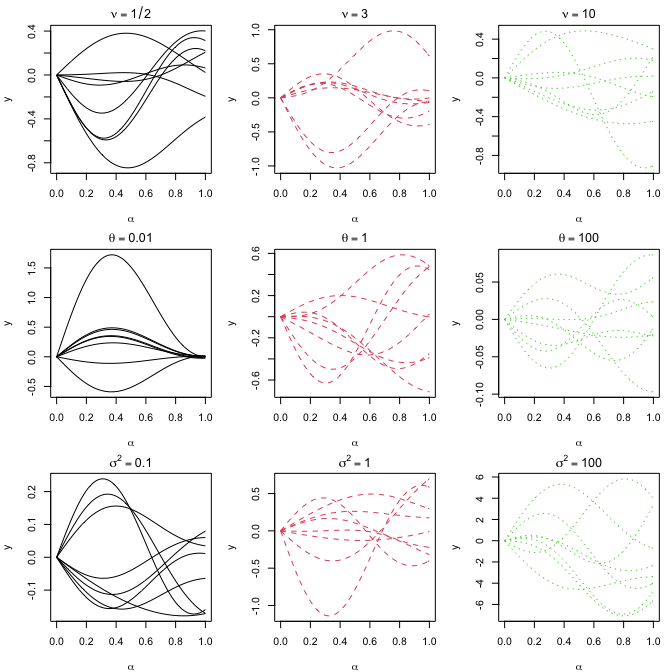
    Consider a linear kernel with various choices of parameter settings, including nu, theta, s2.

    • First row: Set theta=1 and s2=1 and set different values for nu, which are 0.5, 3, and 10.
    • Second row: Set nu=2.5 and s2=1 and set different values for theta, which are 0.01, 1, and 100.
    • Third row: Set nu=2.5 and theta=1 and set different values for s2, which are 0.01, 1, and 100.
    theta <- 1
    s2 <- 1
    nu <- c(0.5,3,10)
    K1 <- kernel.linear(nu=nu[1], theta=theta)
    K2 <- kernel.linear(nu=nu[2], theta=theta) 
    K3 <- kernel.linear(nu=nu[3], theta=theta) 
    
    par(mfrow=c(3,3), mar = c(4, 4, 2, 1))
    matplot(seq(0,1,0.01), t(rmvnorm(8,sigma=s2*K1)), type="l", col=1, lty=1, 
            xlab=expression(alpha), ylab="y", main=expression(nu==1/2))
    matplot(seq(0,1,0.01), t(rmvnorm(8,sigma=s2*K2)), type="l", col=2, lty=2, 
            xlab=expression(alpha), ylab="y", main=expression(nu==3))
    matplot(seq(0,1,0.01), t(rmvnorm(8,sigma=s2*K3)), type="l", col=3, lty=3, xlab=expression(alpha), 
            ylab="y", main=expression(nu==10))
    
    nu <- 2.5
    theta <- c(0.01,1,100)
    s2 <- 1
    K1 <- kernel.linear(nu=nu, theta=theta[1])
    K2 <- kernel.linear(nu=nu, theta=theta[2]) 
    K3 <- kernel.linear(nu=nu, theta=theta[3])
    matplot(seq(0,1,0.01), t(rmvnorm(8,sigma=s2*K1)), type="l", col=1, lty=1, 
            xlab=expression(alpha), ylab="y", main=expression(theta==0.01))
    matplot(seq(0,1,0.01), t(rmvnorm(8,sigma=s2*K2)), type="l", col=2, lty=2, 
            xlab=expression(alpha), ylab="y", main=expression(theta==1))
    matplot(seq(0,1,0.01), t(rmvnorm(8,sigma=s2*K3)), type="l", col=3, lty=3, xlab=expression(alpha), 
            ylab="y", main=expression(theta==100))
    
    nu <- 2.5
    theta <- 1
    s2 <- c(0.1,1,100)
    K1 <- kernel.linear(nu=nu, theta=theta)
    K2 <- kernel.linear(nu=nu, theta=theta) 
    K3 <- kernel.linear(nu=nu, theta=theta) 
    
    matplot(seq(0,1,0.01), t(rmvnorm(8,sigma=s2[1]*K1)), type="l", col=1, lty=1, 
            xlab=expression(alpha), ylab="y", main=expression(sigma^2==0.1))
    matplot(seq(0,1,0.01), t(rmvnorm(8,sigma=s2[2]*K2)), type="l", col=2, lty=2, 
            xlab=expression(alpha), ylab="y", main=expression(sigma^2==1))
    matplot(seq(0,1,0.01), t(rmvnorm(8,sigma=s2[3]*K3)), type="l", col=3, lty=3, xlab=expression(alpha), 
            ylab="y", main=expression(sigma^2==100))

    Reproducing Figure S2

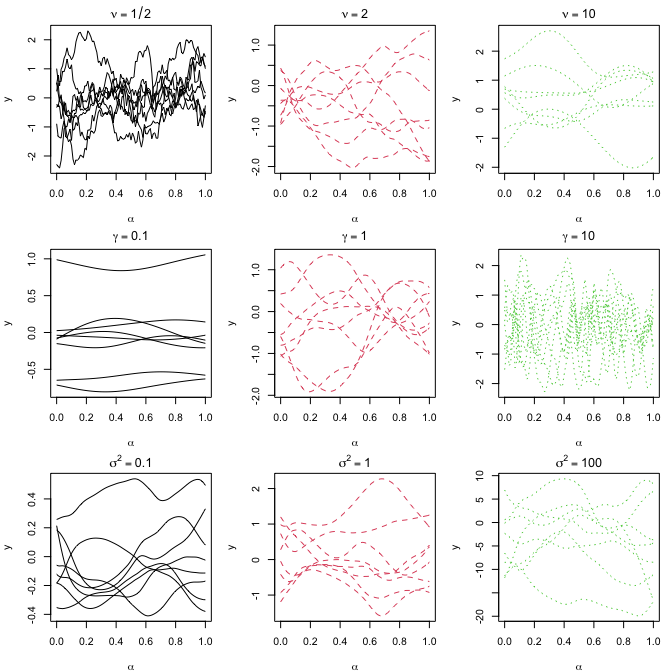
    Consider a non-linear kernel with various choices of parameter settings, including nu, gamma, s2.

    • First row: Set gamma=1 and s2=1 and set different values for nu, which are 0.5, 2, and 10.
    • Second row: Set nu=2.5 and s2=1 and set different values for gamma, which are 0.1, 1, and 10.
    • Third row: Set nu=2.5 and gamma=1 and set different values for s2, which are 0.1, 1, and 100.
    gamma <- 1
    s2 <- 1
    nu <- c(0.5,2,10)
    K1 <- kernel.nonlinear(nu=nu[1], theta=gamma)
    K2 <- kernel.nonlinear(nu=nu[2], theta=gamma) 
    K3 <- kernel.nonlinear(nu=nu[3], theta=gamma) 
    
    par(mfrow=c(3,3), mar = c(4, 4, 2, 1))
    matplot(seq(0,1,0.01), t(rmvnorm(8,sigma=s2*K1)), type="l", col=1, lty=1, 
            xlab=expression(alpha), ylab="y", main=expression(nu==1/2))
    matplot(seq(0,1,0.01), t(rmvnorm(8,sigma=s2*K2)), type="l", col=2, lty=2, 
            xlab=expression(alpha), ylab="y", main=expression(nu==2))
    matplot(seq(0,1,0.01), t(rmvnorm(8,sigma=s2*K3)), type="l", col=3, lty=3, xlab=expression(alpha), 
            ylab="y", main=expression(nu==10))
    
    nu <- 2.5
    gamma <- c(0.1,1,10)
    s2 <- 1
    K1 <- kernel.nonlinear(nu=nu, theta=gamma[1])
    K2 <- kernel.nonlinear(nu=nu, theta=gamma[2]) 
    K3 <- kernel.nonlinear(nu=nu, theta=gamma[3])
    matplot(seq(0,1,0.01), t(rmvnorm(8,sigma=s2*K1)), type="l", col=1, lty=1, 
            xlab=expression(alpha), ylab="y", main=expression(gamma==0.1))
    matplot(seq(0,1,0.01), t(rmvnorm(8,sigma=s2*K2)), type="l", col=2, lty=2, 
            xlab=expression(alpha), ylab="y", main=expression(gamma==1))
    matplot(seq(0,1,0.01), t(rmvnorm(8,sigma=s2*K3)), type="l", col=3, lty=3, xlab=expression(alpha), 
            ylab="y", main=expression(gamma==10))
    
    nu <- 2.5
    gamma <- 1
    s2 <- c(0.1,1,100)
    K1 <- kernel.nonlinear(nu=nu, theta=gamma)
    K2 <- kernel.nonlinear(nu=nu, theta=gamma) 
    K3 <- kernel.nonlinear(nu=nu, theta=gamma) 
    
    matplot(seq(0,1,0.01), t(rmvnorm(8,sigma=s2[1]*K1)), type="l", col=1, lty=1, 
            xlab=expression(alpha), ylab="y", main=expression(sigma^2==0.1))
    matplot(seq(0,1,0.01), t(rmvnorm(8,sigma=s2[2]*K2)), type="l", col=2, lty=2, 
            xlab=expression(alpha), ylab="y", main=expression(sigma^2==1))
    matplot(seq(0,1,0.01), t(rmvnorm(8,sigma=s2[3]*K3)), type="l", col=3, lty=3, xlab=expression(alpha), 
            ylab="y", main=expression(sigma^2==100))

    Reproducing Section 4: Prediction Performance

    Three different test functions are considered:

    • $f_1(g)=\int\int g$
    • $f_2(g)=\int\int g^3$
    • $f_3(g)=\int\int \sin(g^2)$

    Eight training functional inputs are

    • $g(x_1,x_2)=x_1+x_2$
    • $g(x_1,x_2)=x_1^2$
    • $g(x_1,x_2)=x_2^2$
    • $g(x_1,x_2)=1+x_1$
    • $g(x_1,x_2)=1+x_2$
    • $g(x_1,x_2)=1+x_1x_2$
    • $g(x_1,x_2)=\sin(x_1)$
    • $g(x_1,x_2)=\cos(x_1+x_2)$

    The domain space of $x$ is $[0,1]^2$.

    Test functional inputs are

    • $g(x_1,x_2)=\sin(\alpha_1x_1+\alpha_2x_2)$
    • $g(x_1,x_2)=\beta +x_1^2+x_2^3$
    • $g(x_1,x_2)=\exp(-\kappa x_1x_2)$

    with random $\alpha_1,\alpha_2, \beta$ and $\kappa$ from $[0,1]$.

    # training functional inputs (G)
    G <- list(function(x) x[1]+x[2],
              function(x) x[1]^2,
              function(x) x[2]^2,
              function(x) 1+x[1],
              function(x) 1+x[2],
              function(x) 1+x[1]*x[2],
              function(x) sin(x[1]),
              function(x) cos(x[1]+x[2]))
    n <- length(G)
    # y1: integrate g function from 0 to 1
    y1 <- rep(0, n) 
    for(i in 1:n) y1[i] <- hcubature(G[[i]], lower=c(0, 0),upper=c(1,1))$integral
    
    # y2: integrate g^3 function from 0 to 1
    G.cubic <- list(function(x) (x[1]+x[2])^3,
                     function(x) (x[1]^2)^3,
                     function(x) (x[2]^2)^3,
                     function(x) (1+x[1])^3,
                     function(x) (1+x[2])^3,
                     function(x) (1+x[1]*x[2])^3,
                     function(x) (sin(x[1]))^3,
                     function(x) (cos(x[1]+x[2]))^3)
    y2 <- rep(0, n) 
    for(i in 1:n) y2[i] <- hcubature(G.cubic[[i]], lower=c(0, 0),upper=c(1,1))$integral
    
    # y3: integrate sin(g^2) function from 0 to 1
    G.sin <- list(function(x) sin((x[1]+x[2])^2),
                  function(x) sin((x[1]^2)^2),
                  function(x) sin((x[2]^2)^2),
                  function(x) sin((1+x[1])^2),
                  function(x) sin((1+x[2])^2),
                  function(x) sin((1+x[1]*x[2])^2),
                  function(x) sin((sin(x[1]))^2),
                  function(x) sin((cos(x[1]+x[2]))^2))
    y3 <- rep(0, n) 
    for(i in 1:n) y3[i] <- hcubature(G.sin[[i]], lower=c(0, 0),upper=c(1,1))$integral
    Reproducing Table S1
    Y <- cbind(y1,y2,y3)
    knitr::kable(round(t(Y),2))
    y1 1.00 0.33 0.33 1.50 1.50 1.25 0.46 0.50
    y2 1.50 0.14 0.14 3.75 3.75 2.15 0.18 0.26
    y3 0.62 0.19 0.19 0.49 0.49 0.84 0.26 0.33

    Now we are ready to fit a FIGP model. In each for loop, we fit a FIGP for each of y1, y2 and y3. In each for loop, we also compute LOOCV errors by loocv function.

    loocv.l <- loocv.nl <- rep(0,3)
    gp.fit <- gpnl.fit <- vector("list", 3)
    set.seed(1)
    for(i in 1:3){
      # fit FIGP with a linear kernel
      gp.fit[[i]] <- FIGP(G, d=2, Y[,i], nu=2.5, nug=eps, kernel="linear")
      loocv.l[i] <- loocv(gp.fit[[i]])
      
      # fit FIGP with a nonlinear kernel
      gpnl.fit[[i]] <- FIGP(G, d=2, Y[,i], nu=2.5, nug=eps, kernel="nonlinear")
      loocv.nl[i] <- loocv(gpnl.fit[[i]])
    }

    As a comparison, we consider two basis expansion approaches. The first method is KL expansion.

    # for comparison: basis expansion approach
    # KL expansion that explains 99% of the variance
    set.seed(1)
    KL.out <- KL.expan(d=2, G, fraction=0.99, rnd=1e3)
    B <- KL.out$B
      
    KL.fit <- vector("list", 3)
    # fit a conventional GP on the scores
    for(i in 1:3) KL.fit[[i]] <- sepGP(B, Y[,i], nu=2.5, nug=eps)

    The second method is Taylor expansion with degree 3.

    # for comparison: basis expansion approach
    # Taylor expansion coefficients for each functional input
    taylor.coef <- matrix(c(0,1,1,rep(0,7),
                            rep(0,4),1,rep(0,5),
                            rep(0,5),1,rep(0,4),
                            rep(1,2),rep(0,8),
                            1,0,1,rep(0,7),
                            1,0,0,1,rep(0,6),
                            0,1,rep(0,6),-1/6,0,
                            1,0,0,-1,-1/2,-1/2,rep(0,4)),ncol=10,byrow=TRUE)
    
    TE.fit <- vector("list", 3)
    # fit a conventional GP on the coefficients
    for(i in 1:3) TE.fit[[i]] <- sepGP(taylor.coef, Y[,i], nu=2.5, nug=eps, scale.fg=FALSE, iso.fg=TRUE)

    Let’s make predictions on the test functional inputs. We test n.test times.

    set.seed(1)
    n.test <- 100
    
    alpha1 <- runif(n.test,0,1)
    alpha2 <- runif(n.test,0,1)
    beta1 <- runif(n.test,0,1)
    kappa1 <- runif(n.test,0,1)
    
    mse.linear <- mse.nonlinear <- mse.kl <- mse.te <- 
      cvr.linear <- cvr.nonlinear <- cvr.kl <- cvr.te <- 
      score.linear <- score.nonlinear <- score.kl <- score.te <-rep(0,3)
    
    # scoring rule function
    score <- function(x, mu, sig2){
      if(any(sig2==0)) sig2[sig2==0] <- eps
      -(x-mu)^2/sig2-log(sig2)
    }
    
    for(i in 1:3){
      mse.linear.i <- mse.nonlinear.i <- mse.kl.i <- mse.te.i <- 
        cvr.linear.i <- cvr.nonlinear.i <- cvr.kl.i <- cvr.te.i <- 
        score.linear.i <- score.nonlinear.i <- score.kl.i <- score.te.i <- rep(0, n.test)
      for(ii in 1:n.test){
        gnew <- list(function(x) sin(alpha1[ii]*x[1]+alpha2[ii]*x[2]),
                     function(x) beta1[ii]+x[1]^2+x[2]^3,
                     function(x) exp(-kappa1[ii]*x[1]*x[2]))    
        if(i==1){
          g.int <- gnew
        }else if(i==2){
          g.int <- list(function(x) (sin(alpha1[ii]*x[1]+alpha2[ii]*x[2]))^3,
                        function(x) (beta1[ii]+x[1]^2+x[2]^3)^3,
                        function(x) (exp(-kappa1[ii]*x[1]*x[2]))^3)
        }else if(i==3){
          g.int <- list(function(x) sin((sin(alpha1[ii]*x[1]+alpha2[ii]*x[2]))^2),
                        function(x) sin((beta1[ii]+x[1]^2+x[2]^3)^2),
                        function(x) sin((exp(-kappa1[ii]*x[1]*x[2]))^2))
        }
        
        n.new <- length(gnew)
        y.true <- rep(0,n.new)
        for(iii in 1:n.new) y.true[iii] <- hcubature(g.int[[iii]], lower=c(0, 0),upper=c(1,1))$integral
        
        # FIGP: linear kernel
        ynew <- pred.FIGP(gp.fit[[i]], gnew)
        mse.linear.i[ii] <- mean((y.true - ynew$mu)^2)
        lb <- ynew$mu - qnorm(0.975)*sqrt(ynew$sig2)
        ub <- ynew$mu + qnorm(0.975)*sqrt(ynew$sig2)
        cvr.linear.i[ii] <- mean(y.true > lb & y.true < ub)
        score.linear.i[ii] <- mean(score(y.true, ynew$mu, ynew$sig2))
        
        # FIGP: nonlinear kernel
        ynew <- pred.FIGP(gpnl.fit[[i]], gnew)
        mse.nonlinear.i[ii] <- mean((y.true - ynew$mu)^2)
        lb <- ynew$mu - qnorm(0.975)*sqrt(ynew$sig2)
        ub <- ynew$mu + qnorm(0.975)*sqrt(ynew$sig2)
        cvr.nonlinear.i[ii] <- mean(y.true > lb & y.true < ub)
        score.nonlinear.i[ii] <- mean(score(y.true, ynew$mu, ynew$sig2))
        
        # FPCA
        B.new <- KL.Bnew(KL.out, gnew)
        ynew <- pred.sepGP(KL.fit[[i]], B.new)
        mse.kl.i[ii] <- mean((y.true - ynew$mu)^2)
        lb <- ynew$mu - qnorm(0.975)*sqrt(ynew$sig2)
        ub <- ynew$mu + qnorm(0.975)*sqrt(ynew$sig2)
        cvr.kl.i[ii] <- mean(y.true > lb & y.true < ub)
        score.kl.i[ii] <- mean(score(y.true, ynew$mu, ynew$sig2))
        
        # Taylor expansion
        taylor.coef.new <- matrix(c(0,alpha1[ii],alpha2[ii],0,0,0,alpha1[ii]^2*alpha2[ii]/2,alpha1[ii]*alpha2[ii]^2/2,alpha1[ii]^3/6,alpha2[ii]^3/6,
                                    beta1[ii],rep(0,3),1,rep(0,4),1,
                                    1,0,0,-kappa1[ii],rep(0,6)),ncol=10,byrow=TRUE)
        ynew <- pred.sepGP(TE.fit[[i]], taylor.coef.new)
        mse.te.i[ii] <- mean((y.true - ynew$mu)^2)
        lb <- ynew$mu - qnorm(0.975)*sqrt(ynew$sig2)
        ub <- ynew$mu + qnorm(0.975)*sqrt(ynew$sig2)
        cvr.te.i[ii] <- mean(y.true > lb & y.true < ub)
        score.te.i[ii] <- mean(score(y.true, ynew$mu, ynew$sig2))
      }
      mse.linear[i] <- mean(mse.linear.i)
      mse.nonlinear[i] <- mean(mse.nonlinear.i)
      mse.kl[i] <- mean(mse.kl.i)
      mse.te[i] <- mean(mse.te.i)
      cvr.linear[i] <- mean(cvr.linear.i)*100
      cvr.nonlinear[i] <- mean(cvr.nonlinear.i)*100
      cvr.kl[i] <- mean(cvr.kl.i)*100
      cvr.te[i] <- mean(cvr.te.i)*100
      score.linear[i] <- mean(score.linear.i)
      score.nonlinear[i] <- mean(score.nonlinear.i)
      score.kl[i] <- mean(score.kl.i)
      score.te[i] <- mean(score.te.i)
    }
    Reproducing Table 1
    out <- rbind(format(loocv.l,digits=4),
                 format(loocv.nl,digits=4),
                 format(mse.linear,digits=4),
                 format(mse.nonlinear,digits=4),
                 format(sapply(gp.fit,"[[", "ElapsedTime"),digits=4),
                 format(sapply(gpnl.fit,"[[", "ElapsedTime"),digits=4))
    rownames(out) <- c("linear LOOCV", "nonlinear LOOCV", "linear MSE", "nonlinear MSE", "linear time", "nonlinear time")
    colnames(out) <- c("y1", "y2", "y3")
    knitr::kable(out)
    y1 y2 y3
    linear LOOCV 7.867e-07 1.813e+00 4.541e-01
    nonlinear LOOCV 2.150e-06 2.274e-01 1.662e-02
    linear MSE 6.388e-10 1.087e+00 1.397e-01
    nonlinear MSE 3.087e-07 1.176e-02 1.640e-02
    linear time 8.650 8.488 8.450
    nonlinear time 0.728 0.908 0.972
    Reproducing Table S2
    select.idx <- apply(rbind(loocv.l, loocv.nl), 2, which.min)
    select.mse <- diag(rbind(mse.linear, mse.nonlinear)[select.idx,])
    select.cvr <- diag(rbind(cvr.linear, cvr.nonlinear)[select.idx,])
    select.score <- diag(rbind(score.linear, score.nonlinear)[select.idx,])
    
    out <- rbind(format(select.mse,digits=4),
                 format(mse.kl,digits=4),
                 format(mse.te,digits=4),
                 format(select.cvr,digits=4),
                 format(cvr.kl,digits=4),
                 format(cvr.te,digits=4),
                 format(select.score,digits=4),
                 format(score.kl,digits=4),
                 format(score.te,digits=4))
    rownames(out) <- c("FIGP MSE", "Basis MSE", "T3 MSE", 
                       "FIGP coverage", "Basis coverage", "T3 coverage", 
                       "FIGP score", "Basis score", "T3 score")
    colnames(out) <- c("y1", "y2", "y3")
    knitr::kable(out)
    y1 y2 y3
    FIGP MSE 6.388e-10 1.176e-02 1.640e-02
    Basis MSE 0.0001827 0.1242804 0.0227310
    T3 MSE 0.09349 1.27116 0.04747
    FIGP coverage 96.33 100.00 100.00
    Basis coverage 100.00 92.33 76.00
    T3 coverage 100.00 98.33 100.00
    FIGP score 14.899 2.571 3.458
    Basis score 6.6306 1.2074 0.2902
    T3 score 1.064 -1.364 2.047

    Reproducing Section 5: Inverse Scattering Problems

    Now we move to a real problem: inverse scattering problem. First, since the data were generated through Matlab, we use the function readMat in the package R.matlab to read the data. There were ten training data points, where the functional inputs are

    • $g(x_1,x_2)=1$
    • $g(x_1,x_2)=1+x_1$
    • $g(x_1,x_2)=1-x_1$
    • $g(x_1,x_2)=1+x_1x_2$
    • $g(x_1,x_2)=1-x_1x_2$
    • $g(x_1,x_2)=1+x_2$
    • $g(x_1,x_2)=1+x_1^2$
    • $g(x_1,x_2)=1-x_1^2$
    • $g(x_1,x_2)=1+x_2^2$
    • $g(x_1,x_2)=1-x_2^2$
    Reproducing Figure 2

    The outputs are displayed as follows, which reproduces Figure 2.

    func.title <- c("g(x1,x2)=1", "g(x1,x2)=1+x1", "g(x1,x2)=1-x1","g(x1,x2)=1+x1x2",
                    "g(x1,x2)=1-x1x2","g(x1,x2)=1+x2","g(x1,x2)=1+x1^2","g(x1,x2)=1-x1^2",
                    "g(x1,x2)=1+x2^2","g(x1,x2)=1-x2^2")
    
    output.mx <- matrix(0,nrow=10,ncol=32*32)
    par(mfrow=c(2,5))
    par(mar = c(1, 1, 2, 1))
    for(i in 1:10){
      g.out <- readMat(paste0("DATA/q_func",i,".mat"))$Ffem
      image(Re(g.out), zlim=c(0.05,0.11),yaxt="n",xaxt="n",
            col=heat.colors(12, rev = FALSE),
            main=func.title[i])
      contour(Re(g.out), add = TRUE, nlevels = 5)
      output.mx[i,] <- c(Re(g.out))
    }

    We perform PCA (principal component analysis) for dimension reduction, which shows that only three components can explain more than 99.99% variation of the data.

    pca.out <- prcomp(output.mx, scale = FALSE, center = FALSE)
    n.comp <- which(summary(pca.out)$importance[3,] > 0.9999)[1]
    print(n.comp)
    ## PC3 
    ##   3
    
    Reproducing Figure S3

    Plot the three principal components, which reproduces Figure S3.

    par(mfrow=c(1,3))
    par(mar = c(1, 1, 2, 1))
    for(i in 1:n.comp){
      eigen.vec <- matrix(c(pca.out$rotation[,i]), 32, 32)
      image(eigen.vec,yaxt="n",xaxt="n",
            col=heat.colors(12, rev = FALSE),
            main=paste("PC",i))
      contour(eigen.vec, add = TRUE, nlevels = 5)
    }

    Now we are ready to fit the FIGP model on those PC scores. Similarly, we fit the FIGP with a linear kernel and a nonlinear kernel.

    # training functional inputs (G)
    G <- list(function(x) 1,
              function(x) 1+x[1],
              function(x) 1-x[1],
              function(x) 1+x[1]*x[2],
              function(x) 1-x[1]*x[2],
              function(x) 1+x[2],
              function(x) 1+x[1]^2,
              function(x) 1-x[1]^2,
              function(x) 1+x[2]^2,
              function(x) 1-x[2]^2)
    n <- length(G)
    
    set.seed(1)
    gp.fit <- gpnl.fit <- vector("list",n.comp)
    for(i in 1:n.comp){
      y <- pca.out$x[,i]
      # fit FIGP with a linear kernel  
      gp.fit[[i]] <- FIGP(G, d=2, y, nu=2.5, nug=eps, kernel = "linear")
      # fit FIGP with a nonlinear kernel    
      gpnl.fit[[i]] <- FIGP(G, d=2, y, nu=2.5, nug=eps, kernel = "nonlinear")
    }

    Perform a LOOCV to see which kernel is a better choice.

    loocv.recon <- sapply(gp.fit, loocv.pred) %*% t(pca.out$rotation[,1:n.comp])
    loocv.linear <- mean((loocv.recon - output.mx)^2)
    
    loocv.nl.recon <- sapply(gpnl.fit, loocv.pred) %*% t(pca.out$rotation[,1:n.comp])
    loocv.nonlinear <- mean((loocv.nl.recon - output.mx)^2)
    
    out <- c(loocv.linear, loocv.nonlinear)
    names(out) <- c("linear", "nonlinear")
    print(out)
    ##       linear    nonlinear 
    ## 3.648595e-06 1.156923e-05
    

    We see linear kernel leads to a smaller LOOCV, which indicates that it’s a better choice.

    Reproducing Figure S4

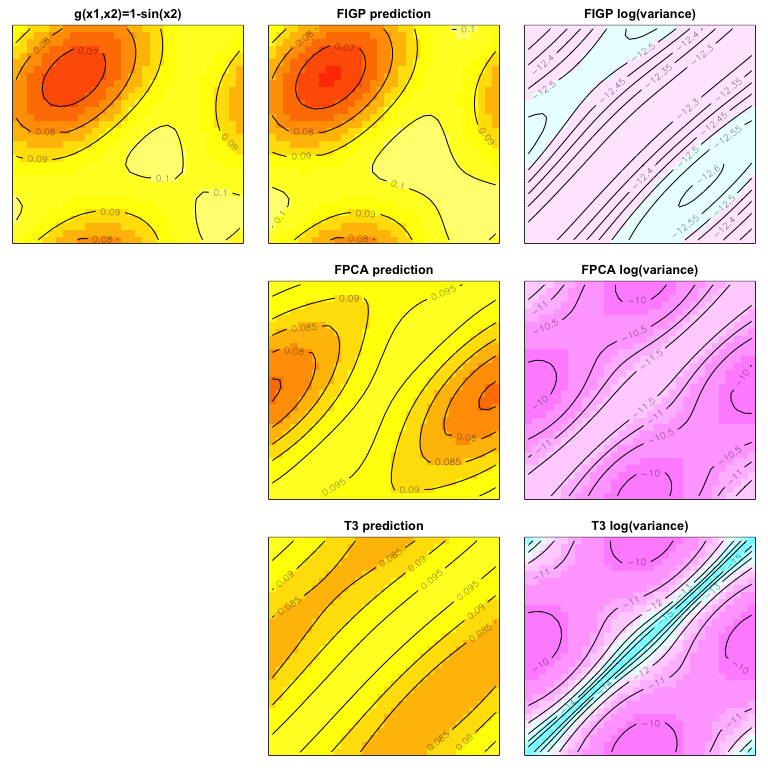
    Thus, we perform the predictions on a test input using the FIGP model with the linear kernel, which is

    • $g(x_1,x_2)=1-\sin(x_2)$
    # test functional inputs (gnew)
    gnew <- list(function(x) 1-sin(x[2]))
    n.new <- length(gnew)
    
    # make predictions using a linear kernel
    ynew <- s2new <- matrix(0,ncol=n.comp,nrow=n.new)
    for(i in 1:n.comp){
      pred.out <- pred.FIGP(gp.fit[[i]], gnew)
      ynew[,i] <- pred.out$mu
      s2new[,i] <- pred.out$sig2
    }
    
    # reconstruct the image
    pred.recon <- ynew %*% t(pca.out$rotation[,1:n.comp])
    s2.recon <- s2new %*% t(pca.out$rotation[,1:n.comp]^2)
    
    # FPCA method for comparison
    KL.out <- KL.expan(d=2, G, fraction=0.99, rnd=1e3)
    B <- KL.out$B
    B.new <- KL.Bnew(KL.out, gnew)
    
    ynew <- s2new <- matrix(0,ncol=n.comp,nrow=n.new)
    KL.fit <- vector("list", n.comp)
    for(i in 1:n.comp){
      KL.fit[[i]] <- sepGP(B, pca.out$x[,i], nu=2.5, nug=eps)
      pred.out <- pred.sepGP(KL.fit[[i]], B.new)
      ynew[,i] <- drop(pred.out$mu)
      s2new[,i] <- drop(pred.out$sig2)
    }
    
    # reconstruct the image
    pred.KL.recon <- ynew %*% t(pca.out$rotation[,1:n.comp])
    s2.KL.recon <- s2new %*% t(pca.out$rotation[,1:n.comp]^2)
    
    # Taylor method for comparison
    ynew <- s2new <- matrix(0,ncol=n.comp,nrow=n.new)
    taylor.coef <- matrix(c(c(1,1,0,0,0,0,0),
                          c(1,-1,0,0,0,0,0),
                          c(1,0,0,1,0,0,0),
                          c(1,0,0,-1,0,0,0),
                          c(1,0,1,0,0,0,0),
                          c(1,0,-1,0,0,0,0),
                          c(1,0,0,0,1,0,0),
                          c(1,0,0,0,-1,0,0),
                          c(1,0,0,0,0,1,0),
                          c(1,0,0,0,0,-1,0)),ncol=7,byrow=TRUE)
    taylor.coef.new <- matrix(c(1,0,-1,0,0,0,1/6),ncol=7)
    
    TE.fit <- vector("list", n.comp)
    for(i in 1:n.comp) {
      TE.fit[[i]] <- sepGP(taylor.coef, pca.out$x[,i], nu=2.5, nug=eps, scale.fg=FALSE, iso.fg=TRUE)
      pred.out <- pred.sepGP(TE.fit[[i]], taylor.coef.new)
      ynew[,i] <- drop(pred.out$mu)
      s2new[,i] <- drop(pred.out$sig2)
    }
    
    # reconstruct the image
    pred.TE.recon <- ynew %*% t(pca.out$rotation[,1:n.comp])
    s2.TE.recon <- s2new %*% t(pca.out$rotation[,1:n.comp]^2)
    
    # true data on the test data
    gnew.true <- matrix(0, ncol=n.new, nrow=32*32)
    gnew.dat <- readMat(paste0("DATA/q_sine.mat"))$Ffem
    gnew.true[,1] <- c(Re(gnew.dat))
    
    
    # plot the result
    par(mfrow=c(3,3))
    par(mar = c(1, 1, 2, 1))
    
    mse.figp <- mse.kl <- mse.taylor <- 
      score.figp <- score.kl <- score.taylor <- rep(0, n.new)
    
    for(i in 1:n.new){
      image(matrix(gnew.true[,i],32,32), zlim=c(0.05,0.11),yaxt="n",xaxt="n",
            col=heat.colors(12, rev = FALSE),
            main=ifelse(i==1, "g(x1,x2)=1-sin(x2)", "g(x1,x2)=1"))
      contour(matrix(gnew.true[,i],32,32), add = TRUE, nlevels = 5)
      
      image(matrix(pred.recon[i,], 32, 32), zlim=c(0.05,0.11),yaxt="n",xaxt="n",
            col=heat.colors(12, rev = FALSE),
            main="FIGP prediction")
      contour(matrix(pred.recon[i,], 32, 32), add = TRUE, nlevels = 5)
      
      image(matrix(log(s2.recon[i,]), 32, 32), zlim=c(-16,-9), yaxt="n",xaxt="n",
            col=cm.colors(12, rev = FALSE),
            main="FIGP log(variance)")
      contour(matrix(log(s2.recon[i,]), 32, 32), add = TRUE, nlevels = 5)
      
      mse.figp[i] <- mean((gnew.true[,i]-pred.recon[i,])^2)
      score.figp[i] <- mean(score(gnew.true[,i], pred.recon[i,], s2.recon[i,]))
      
      # empty plot
      plot.new()
      
      image(matrix(pred.KL.recon[i,], 32, 32), zlim=c(0.05,0.11),yaxt="n",xaxt="n",
            col=heat.colors(12, rev = FALSE),
            main="FPCA prediction")
      contour(matrix(pred.KL.recon[i,], 32, 32), add = TRUE, nlevels = 5)
      mse.kl[i] <- mean((gnew.true[,i]-pred.KL.recon[i,])^2)
      score.kl[i] <- mean(score(gnew.true[,i], pred.KL.recon[i,], s2.KL.recon[i,]))
      
      image(matrix(log(s2.KL.recon[i,]), 32, 32), zlim=c(-16,-9), yaxt="n",xaxt="n",
            col=cm.colors(12, rev = FALSE),
            main="FPCA log(variance)")
      contour(matrix(log(s2.KL.recon[i,]), 32, 32), add = TRUE, nlevels = 5)
      
      # empty plot
      plot.new()
      
      image(matrix(pred.TE.recon[i,], 32, 32), zlim=c(0.05,0.11),yaxt="n",xaxt="n",
            col=heat.colors(12, rev = FALSE),
            main="T3 prediction")
      contour(matrix(pred.TE.recon[i,], 32, 32), add = TRUE, nlevels = 5)
      
      image(matrix(log(s2.TE.recon[i,]), 32, 32), zlim=c(-16,-9), yaxt="n",xaxt="n",
            col=cm.colors(12, rev = FALSE),
            main="T3 log(variance)")
      contour(matrix(log(s2.TE.recon[i,]), 32, 32), add = TRUE, nlevels = 5)
      
      mse.taylor[i] <- mean((gnew.true[,i]-pred.TE.recon[i,])^2)
      score.taylor[i] <- mean(score(gnew.true[,i], pred.TE.recon[i,], s2.TE.recon[i,]))
    }

    Reproducing Table 2

    The prediction performance for the test data is given below.

    out <- cbind(mse.figp, mse.kl, mse.taylor)
    out <- rbind(out, cbind(score.figp, score.kl, score.taylor))
    colnames(out) <- c("FIGP", "FPCA", "T3")
    rownames(out) <- c("MSE", "score")
    knitr::kable(out)
    FIGP FPCA T3
    MSE 0.0000011 0.000107 0.0000906
    score 12.1301269 6.890083 6.3916707
    Visit original content creator repository
  • ENCM509-Labs

    ENCM 509 – Fundamentals of Biometric Systems Design Labs

    Python Jupyter NumPy Matplotlib SciPy Pandas scikit-learn TensorFlow

    Lab 1

    Introduction to libraries such as NumPy, Matplotlib, and SciPy

    Lab 2

    The purpose of this lab is to utilize statistical analysis to distinguish between “genuine” and “imposter” written signatures. Before applying statistical analysis, we will be collecting written signatures using the Wacom Intuos tablet. We’ll use this tablet to capture coordinate and pressure values at 200 points/sec as the pen moves across the tablet. The tablet is also capable of recognizing 1024 levels of pressure which will be especially useful in statistical analysis later on. In addition, we’ll also utilize the software SigGet to collect and convert the data to CSV files collected by the tablet. Throughout the lab we will utilize these CSV file samples to plot histograms, 2D and 3D colormaps, as well as normal distributions of both velocity and pressure and the calculation of both mean $(\mu)$ and standard deviation $(\sigma)$ in order to understand and compare trends in the distribution/dispersion of the data between both “genuine” and “imposter” written signatures to see how they differ.

    Lab 3

    The purpose of this lab is to understand biometric-based verification between genuine and imposter signatures for 1:1 matching. In the previous lab, we utilized values such as pressure, time, and coordinates, however, in this lab, we will separate the data into 2 simple classes and train the data based on the EM algorithm. After training the data, we will also utilize the Gaussian Mixture Model (GMM) to calculate log-likelihood scores in order to distinguish the classes of genuine and imposter signatures, essentially “verifying” if the signature is genuine or not. In addition, we will also use the log-likelihood score to calculate both the mean $(\mu)$ and standard deviation $(\sigma)$ of both the imposter and genuine scores in order to plot normal distributions, illustrating how they vary with one another.

    Lab 4

    In this lab we will be focusing on image pre-processing and feature extraction of fingerprints. We will be collecting fingerprints using the Digital Persona UareU 4500, and because the quality of data is affected by many factors, we will collect both good and bad quality fingerprints for analysis. Throughout the lab we will conduct a number of image processing techniques such as normalization and segmentation as well as pre-processing and de-noising techniques such as contrast enhancement (histogram equalization) and the Wiener filter. After applying these processing techniques, we will then calculate the number of Minutiae (ridge endings and bifurcations) and Singularities (points of cores, deltas) in order to assess their impact on the image details of the fingerprints.

    Lab 5

    In this lab we will be focusing on image processing and fingerprint matching. We will be using fingerprints collected by using the Digital Persona UareU 4500. We will be focusing on two main matching algorithms, matching based on Minutiae count (ridge ending and bifurcation), and matching based on scores obtained by Gabor filtering. In addition, we will also change the parameters of Gabor filtering such as the angle and frequency in order to see if it has a visual impact on the processed fingerprint image. Lastly, after running both types of matching algorithms, we will also select thresholds in order to see their impact on the number of true positive matches and false negative matches.

    Lab 6

    In this lab, we will explore facial recognition via Principal Component Analysis (PCA), using the AT&T Database of Faces. Employing Python and Jupyter Notebook, our focus will be on face detection, image processing, and classification through PCA feature extraction and Euclidean Distance matching. We will adjust PCA parameters to study their impact on facial representation and experiment with threshold settings to analyze their effects on true positive and false negative match rates. This practical approach aims to deepen our understanding of biometric verification within facial recognition, blending theoretical concepts with hands-on experience.

    Lab 7

    In this lab, we will undertake the task of hand gesture recognition using data collected by the Ultra Leap developed by Leap Motion. After the data is collected, we will be utilizing deep learning in order to regonize different hand gestures. More specifically, we will utilize a classifier, Long Short-term Memory (LSTM) which is a deep learning model for time-series analysis. Throughout the lab, we will prepare our data, preprocess it, create our model, and performing classification while also changing specific parameters before classification such as the testing set size, number of LSTM layers, and the dropout probability in order to see their effects on accuracy, etc.

    Lab 8

    In this lab, we explore Bayesian Networks (BNs) for machine reasoning using PyAgrum. We’ll construct BNs that mimic real scenarios, like the Diamond Princess infection outbreak. The lab involves setting up network structures and conditional probability tables (CPTs). We’ll perform inference to understand how factors like age and gender influence susceptibility. Exercises in Jupyter Notebook will guide us through these processes. By manipulating BNs, insights into probabilistic decision-making will be gained. We aim to show BNs as a robust framework for reasoning under uncertainty. This practical approach will enhance our comprehension of BNs’ applications. Ultimately, we’ll learn to make informed decisions based on probabilistic models.

    Visit original content creator repository
  • dialogflow-sample-voice-application

    Vonage API – Google Dialogflow integration sample application

    This sample application allows you to call a phone number to interact with a Google Dialogflow agent using Vonage Voice API, including getting real time transcripts and sentiment analysis.

    This application uses a Dialogflow reference connection code (more details below) for the actual 2-way audio interaction with the Dialogflow agent.

    About this sample application

    This sample application makes use of Vonage Voice API to answer incoming voice calls and set up a WebSocket connection to stream audio to and from the Dialogflow reference connection for each call.

    The Dialogflow reference connection code will:

    • Send audio to the Dialogflow agent from caller’s speech,
    • Stream audio responses from the Dialogflow agent to the caller via the WebSocket,
    • Post back in real time transcripts and caller’s speech sentiment scores via webhooks call back to this Voice API sample application.

    Once this application will be running, you call in to the phone number linked to your application (as explained below) to interact via voice with your Dialogflow agent.

    Set up the Dialogflow reference connection code – Host server public hostname and port

    First set up a Dialogflow reference connection code from the dialogflow-reference-connection.

    Default local (not public!) reference connection code port is: 5000.

    If you plan to test using Local deployment with ngrok (Internet tunneling service) for both the Dialogflow reference connection code and this sample application, you may set up multiple ngrok tunnels.

    For the next steps, you will need:

    • The Dialogflow reference connection code server’s public hostname and if necessary public port.

    e.g. xxxxxxxx.ngrok.io, xxxxxxxx.herokuapp.com, myserver.mycompany.com:32000 (as DF_CONNECTING_SERVER, no port, https:// nor http:// are necessary with ngrok or heroku as public hostname)

    Set up your Vonage Voice API application credentials and phone number

    Log in to your or sign up for a Vonage APIs account.

    Go to Your applications, access an existing application or + Create a new application.

    Under Capabilities section (click on [Edit] if you do not see this section):

    Enable Voice

    • Under Answer URL, leave HTTP GET, and enter https://<host>:<port>/answer (replace <host> and <port> with the public host name and if necessary public port of the server where this sample application is running)
    • Under Event URL, select HTTP POST, and enter https://<host>:<port>/event (replace <host> and <port> with the public host name and if necessary public port of the server where this sample application is running)
      Note: If you are using ngrok for this sample application, the answer URL and event URL look like:
      https://yyyyyyyy.ngrok.io/answer
      https://yyyyyyyy.ngrok.io/event
    • Click on [Generate public and private key] if you did not yet create or want new ones, save the private.key file in this application folder.
      IMPORTANT: Do not forget to click on [Save changes] at the bottom of the screen if you have created a new key set.
    • Link a phone number to this application if none has been linked to the application.

    Please take note of your application ID and the linked phone number (as they are needed in the very next section.)

    For the next steps, you will need:

    • Your Vonage API key (as API_KEY)
    • Your Vonage API secret, not signature secret, (as API_SECRET)
    • Your application ID (as APP_ID),
    • The phone number linked to your application (as SERVICE_NUMBER), your phone will call that number,
    • The Dialogflow reference connection code server public hostname and port (as DF_CONNECTING_SERVER)

    Overview on how this sample Voice API application works

    • On an incoming call to the phone number linked to your application, GET /answer route plays a TTS greeting to the caller (“action”: “talk”), then start a WebSocket connection to the Dialogflow agent reference connection (“action”: “connect”),
    • Once the WebSocket is established (GET /ws_event with status “answered”), it plays a TTS greeting to this Dialogflow agent, as the Dialogflow agent expects the user to speak first, we need to start the conversation as one would do in a phone call, with the answerer greeting the caller. The result is that the caller will immediately hear the Dialogflow agent initial greeting (e.g. “How may I help you?”) without having to say anything yet.
      You can customize that inital TTS played to Dialogflow to correspond to your Dialogflow agent programming and use case.
    • Transcripts and sentiment scores will be received by this application in real time,
    • When the caller hangs up, both phone call leg and WebSocket leg will be automatically terminated.

    Running Dialogflow sample Voice API application

    You may select one of the following 2 types of deployments.

    Local deployment

    To run your own instance of this sample application locally, you’ll need an up-to-date version of Node.js (we tested with version 14.3.0).

    Download this sample application code to a local folder, then go to that folder.

    Copy the .env.example file over to a new file called .env:

    cp .env.example .env

    Edit .env file, and set the five parameter values:
    API_KEY=
    API_SECRET=
    APP_ID=
    SERVICE_NUMBER=
    DF_CONNECTING_SERVER=

    Install dependencies once:

    npm install

    Launch the applicatiom:

    node df-application

    Command Line Heroku deployment

    You must first have deployed your application locally, as explained in previous section, and verified it is working.

    Install git.

    Install Heroku command line and login to your Heroku account.

    If you do not yet have a local git repository, create one:

    git init
    git add .
    git commit -am "initial"

    Start by creating this application on Heroku from the command line using the Heroku CLI:

    heroku create myappname

    Note: In above command, replace “myappname” with a unique name on the whole Heroku platform.

    On your Heroku dashboard where your application page is shown, click on Settings button,
    add the following Config Vars and set them with their respective values:
    API_KEY
    API_SECRET
    APP_ID
    SERVICE_NUMBER
    DF_CONNECTING_SERVER

    add also the parameter PRIVATE_KEY_FILE with the value ./private.key

    Now, deploy the application:

    git push heroku master

    On your Heroku dashboard where your application page is shown, click on Open App button, that hostname is the one to be used under your corresponding Vonage Voice API application Capabilities (click on your application, then [Edit]).

    For example, the respective links would be like:
    https://myappname.herokuapp.com/answer
    https://myappname.herokuapp.com/event

    See more details in above section Set up your Vonage Voice API application credentials and phone number.

    From any phone, dial the Vonage number (the one in the .env file). This will connect to the DialogFlow agent (as specified in the .env file), and you will be able to have voice interaction with it.

    Visit original content creator repository

  • amazon-cloudwatch-agent-nix

    Amazon CloudWatch Agent on NixOS

    Flake to install’s the CloudWatch Agent on NixOS.

    TODO

    • more configuration options
    • more documentation
    • PR for nixpkgs

    Usage

    This is how you Install Amazon CloudWatch Agent on NixOS. In the inputs of your
    flake, add the Amazon CloudWatch Agent flake.

    {
      inputs = {
        nixpkgs.url = "github:NixOS/nixpkgs/nixos-23.11";
        amazon-cloudwatch-agent.url = "github:mipmip/amazon-cloudwatch-agent-nix";
      }
    }

    Then you will need to import the module and also add the cloudwatch agent
    software to the system packages.

    Below is an example setup.

    {
      description = "NixOS configuration Amazon CloudWatch Agent";
    
      inputs = {
        nixpkgs.url = "github:NixOS/nixpkgs/nixos-23.11";
        amazon-cloudwatch-agent.url = "github:mipmip/amazon-cloudwatch-agent-nix";
      };
    
      outputs = { self, nixpkgs, amazon-cloudwatch-agent }:
        let
          system = "x86_64-linux";
    
          amazon-cloudwatch-module = amazon-cloudwatch-agent.nixosModules.default;
          amazon-cloudwatch-config = {
            services.amazon-cloudwatch-agent.enable = true;
            environment.systemPackages = [
             amazon-cloudwatch-agent.packages."${system}".amazon-cloudwatch-agent
            ];
          };
    
        in {
          nixosConfigurations."<hostname>" = nixpkgs.lib.nixosSystem {
            inherit system;
            modules = [
              amazon-cloudwatch-module
              amazon-cloudwatch-config
              ./configuration.nix
            ];
          };
        };
    }

    Give CloudWatch Agent permission to publish to CloudWatch

    Once the agent is installed, you just need to make sure it has permission to
    publish its metrics to CloudWatch. You grant this permission by adding a policy
    to the IAM Instance Profile.

    Below is an example piece of Terraform code on how to add this to your EC2
    profile.

    resource "aws_iam_instance_profile" "ssm-access-iam-profile" {
      name = "ec2_profile"
      role = aws_iam_role.ssm-access-iam-role.name
    }
    
    resource "aws_iam_role" "ssm-access-iam-role" {
      name        = "ssm-access-role"
      description = "The role to access EC2 with SSM"
    
      assume_role_policy = jsonencode({
        Version = "2012-10-17"
        Statement = [
          {
            Effect    = "Allow"
            Principal = {
              Service = "ec2.amazonaws.com"
            }
            Action = "sts:AssumeRole"
          }
        ]
      })
    }
    
    resource "aws_iam_role_policy_attachment" "cloudwatch-policy" {
      role       = aws_iam_role.ssm-access-iam-role.name
      policy_arn = "arn:aws:iam::aws:policy/CloudWatchAgentServerPolicy"
    }

    credits

    Visit original content creator repository